Bunny's Paradise - Dialogue, Objectives and Sound Manager
View on GitHubThis page explain multiple key features i worked on and the concept of this game
Game Concept
The idea for this game came from one of my classmates, they wanted to make something with a horror vibe. We started brainstorming and came up with the concept of a game that switches between an idle clicker part and top down story part.
We wanted to make a game where the vibe progressively changes as you discover more of the main characters house. The story idea that my classmates came up with was that of a cannibal with schizophrenia. starting out the art would be cute and inviting and get progressively more macabre
Sadly this project is not close to being finished yet since we had to take a lot of time applying for internships. We also sadly couldn't find any artists and with 6 devs art is a rough topic. I personally intend to put more work into the project even if the school assignment is finished as of recently
I learned a lot from this project, not only about programming and developing but also about leading a team as git master and lead programmer. We decided to try using GitHub's Projects tool for planning and managing version control.
I intend to clean some lazy fixes that where made to make due with the deadline of the project very soon...

Objective System - ObjectiveBase.cs && ObjectiveManager.cs
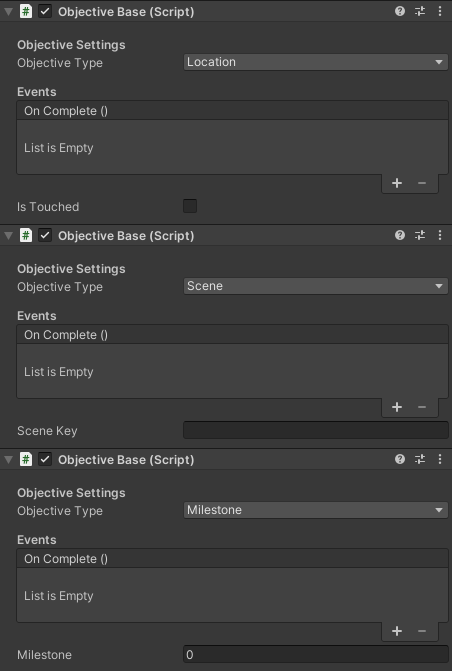
The ObjectiveBase is where the magic of this system takes place. There are 4 types of objectives sadly for now only 3 are used, the ones i use are : Location which uses a boxcollider2D and OnTriggerEnter2D, Scene which looks at the current active scene and Milestone which looks at the currency counter for the idle clicker part
On meeting this objective a unity event is called to optionally do something with the dialogue system
public class ObjectiveBase : MonoBehaviour
{
    [Header("Events")]
    public UnityEvent OnComplete;

    [Header("State")]
    public bool isCompleted;
    public bool isTouched;

    private bool hasFired;

    public enum ObjectiveType
    {
        Location,
        Item,
        Scene,
        Milestone
    }

    [Header("Objective Settings")]
    public ObjectiveType objectiveType;
    public float milestone;
    public string itemKey;
    public string sceneKey;

    private void Start()
    {
        // Safety: ensure event exists even if not assigned in Inspector
        if (OnComplete == null)
            OnComplete = new UnityEvent();
    }

    private void Update()
    {
        // Don't run completion logic in edit mode
        if (!Application.isPlaying)
            return;

        switch (objectiveType)
        {
            case ObjectiveType.Milestone:
                isCompleted = MilestoneComplete();
                break;

            case ObjectiveType.Scene:
                isCompleted = CompareSceneKey();
                break;

            case ObjectiveType.Item:
                // TODO: implement item logic later
                return;
        }

        if (isCompleted && !hasFired)
        {
            hasFired = true;
            OnComplete.Invoke();
        }
    }
}
Feature Workflow
1. Objectives can be easily made due to the inspector.
2. The ObjectiveManager is a queue that sets only the next objective as active.
3. On completion of an objective it is dequeued and the next objective is made available.
This system made making a coherent flowing story possible.
Dialogue System - DialogueContainer.cs && ScrollingText.cs
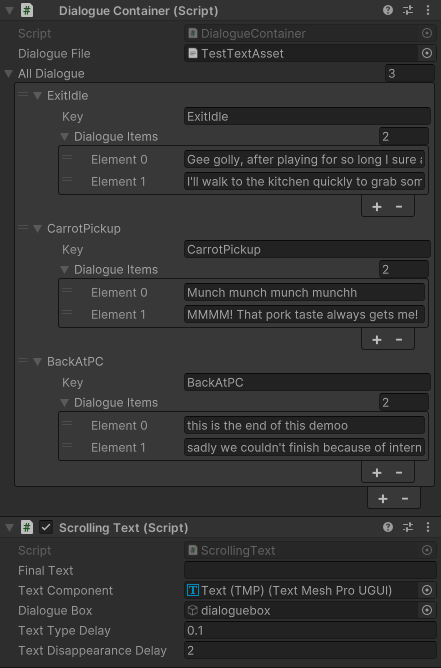
The DialogueContainer is where we store all the dialogue in a custom class kind of like a dictionary. It gets the key for the dialogue lines and the string with the actual dialogue from a json file for easy adding to and removing lines
It is made to be easily accessible so the Objectives can easily queue new lines on completion. When a new array of lines is queued ScrollingText types the lines out letter for letter so it looks like its being typed
The current code is still very messy...
public class DialogueContainer : MonoBehaviour
    {
        [SerializeField] TextAsset dialogueFile;
        public static DialogueContainer instance;


        public string[] CustomQuarry(Dialogue[] dialogues, string key)
        {
            foreach (Dialogue d in dialogues)
            {
                if (d.Key == key)
                {
                    return d.DialogueItems;
                }
            }

            Debug.LogError($"no entry with key: {key}");
            return null;
        }

        // store an array of Dialogue entries (JSON has an array of objects in the TextAsset)
        public Dialogue[] AllDialogue;

        public void Awake()
        {
            Load();
            instance = this;
        }

        public void Load()
        {
            // read JSON from the provided TextAsset and populate AllDialogue
            if (dialogueFile == null)
            {
                Debug.LogWarning("Dialogue file not assigned on " + gameObject.name);
                throw new NullReferenceException();
                return;
            }

            try
            {
                // get trimmed text
                string jsonText = dialogueFile.text?.Trim() ?? string.Empty;

                if (jsonText.StartsWith("["))
                {
                    // top-level array: deserialize directly into Dialogue[] via helper
                    AllDialogue = JsonHelper.FromJson<Dialogue>(jsonText) ?? new Dialogue[0];
                }
                else
                {
                    // assume wrapped object with AllDialogue property
                    var data = JsonUtility.FromJson<DialogueFile>(jsonText);
                    AllDialogue = data != null && data.AllDialogue != null ? data.AllDialogue : new Dialogue[0];
                }

                Debug.Log($"Loaded {AllDialogue.Length} dialogue entries from {dialogueFile.name}");
            }
            catch (Exception ex)
            {
                Debug.LogError("Failed to parse dialogue JSON: " + ex.Message);
                throw new ArgumentException(".json file is malformed or invalid", ex);
                AllDialogue = new Dialogue[0];
            }
        }

        public void SwitchActive(bool active)
        {
            ScrollingText.instance.textComponent.gameObject.SetActive(active);
            ScrollingText.instance.dialogueBox.SetActive(active);
        }

    // Helper: return all keys that were loaded
        public string[] GetAllKeys()
        {
            if (AllDialogue == null) return new string[0];
            var keys = new List <string> (AllDialogue.Length);
            foreach (var d in AllDialogue)
                if (d != null && d.Key != null)
                    keys.Add(d.Key);
            return keys.ToArray();
        }

        public void QueueDialogue(string key)
        {
            string[] queueable = CustomQuarry(AllDialogue, key);
            ScrollingText.instance.MakeTextQueue(queueable);
        }
    }

    // wrapper required because JsonUtility cannot parse a top-level array directly
    [Serializable]
    public class DialogueFile
    {
        public Dialogue[] AllDialogue;
    }

    [Serializable]
    public class Dialogue
    {
        // match JSON property names exactly (JsonUtility is case-sensitive)
        public string Key;
        public string[] DialogueItems;
    }
I did not write any of the json related code my classmate did but it seems to work perfectly
Feature Workflow
1. New lines can be easily added in the json and accessed through their key
2. The ScrollingText is a queue that runs through every line and types them out word for word at a certain interval between characters.
3. You can easily queue a set of lines with unity events.
This system is still very messy and can be improved alot.
Sounds Manager - SoundManager.cs
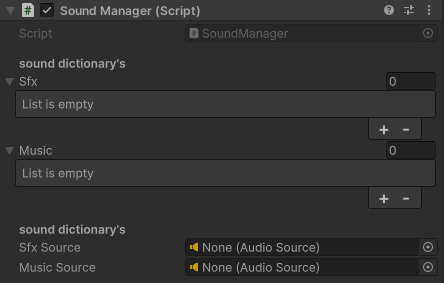
The SoundManager is where we store all the SFX and music which are currently not being used because of time restraints
SFX and music are stored in a custom datatype. Two dictionaries are made, one for SFX and one for music which are both easily accessible with the PlaySfx and SwitchMusic functions
public class SoundManager : MonoBehaviour
{
    [Serializable]
    public struct Sfx
    {
        public string name;
        public AudioClip audioFile;
    }

    [Serializable]
    public struct Music
    {
        public string name;
        public AudioClip audioFile;
    }

    [Header("sound dictionary's")] public Sfx[] sfx;
    public Music[] music;
    public static SoundManager instance;
    [Header("sound dictionary's")] public AudioSource sfxSource;
    public AudioSource musicSource;

    public Dictionary MusicDictionary = new Dictionary();
    public Dictionary SfxDictionary = new Dictionary();

    private void Awake()
    {
        instance = this;
    }

    // Start is called before the first frame update
    void Start()
    {
        foreach (Sfx s in sfx)
        {
            SfxDictionary.Add(s.name, s.audioFile);
        }

        foreach (Music m in music)
        {
            MusicDictionary.Add(m.name, m.audioFile);
        }
    }

    public void PlaySfx(string audioName)
    {
        sfxSource.PlayOneShot(SfxDictionary[audioName]);
    }

    public void SwitchMusic(string audioName)
    {
        musicSource.clip = MusicDictionary[audioName];
        musicSource.Play();
    }
}
} 
Feature Workflow
1. New SFX and Music can be easily dragged into the inspector.
2. You can assign a key to every audio clip in the inspector.
3. The sounds or music can be played through unity events.