Physics In Unity C# - Custom Force System
View on GitHubThis project demonstrates a custom force system for Unity, allowing precise control over physics interactions, forces, and acceleration based on mass.
Force Class - Force.cs
The Force class represents a variable that stores direction, magnitude, acceleration and mass.
using UnityEngine;

public class Force
{
    Vector3 direction;
    float magnitude;

    public Force(Vector3 dir, float mag)
    {
        direction = dir.normalized;
        magnitude = mag;
    }


    public Vector3 GetForceVector()
    {
        return direction * magnitude;
    }

    public Vector3 GetAcceleration(float mass)
    {
        if (mass <= 0f) return Vector3.zero;
        return GetForceVector() / mass;
    }
}
ForceBody Component - ForceBody.cs
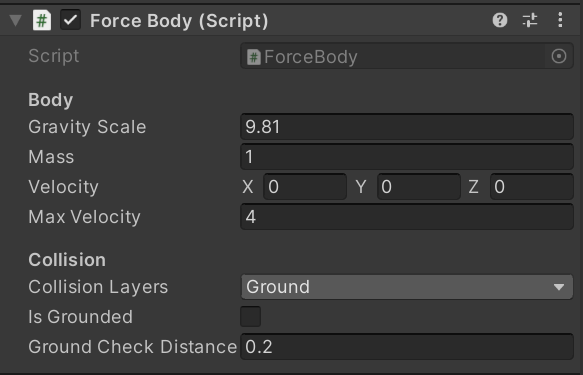
The ForceBody component collects forces acting on a GameObject and updates its velocity and position.
This component also registers if that object is grounded, handles gravity and checks for collisions before moving.
void FixedUpdate()
    {
        tempVelocity = velocity;

        // Ground check
        RaycastHit2D hit = Physics2D.Raycast(transform.position, Vector2.down, groundCheckDistance, collisionLayers);
        Debug.DrawRay(transform.position, Vector2.down * groundCheckDistance, Color.red);
        isGrounded = (hit.collider != null);

        // Apply gravity if airborne
        if (!isGrounded)
            AddForce(new Force(Vector3.down, gravityScale));

        // Apply all forces
        Vector3 totalForce = Vector3.zero;
        foreach (var f in forces)
            totalForce += f.GetAcceleration(mass);

        tempVelocity += totalForce * Time.fixedDeltaTime;
        tempVelocity = Vector3.ClampMagnitude(tempVelocity, maxVelocity);

        Vector2 moveDelta = Vector2.zero;

        // X collisions
        if (!CheckForCollisionsX())
            moveDelta.x = tempVelocity.x * Time.fixedDeltaTime;
        else
            tempVelocity.x = 0;

        // Y collisions
        if (!CheckForCollisionsY())
            moveDelta.y = tempVelocity.y * Time.fixedDeltaTime;
        else
            tempVelocity.y = 0;

        transform.position += (Vector3)moveDelta;
        velocity = tempVelocity;

        forces.Clear();
    }
 public void AddForce(Force f)
    {
        forces.Add(f);
    }

    bool CheckForCollisionsX()
    {
        BoxCollider2D col = GetComponent();
        float direction = Mathf.Sign(tempVelocity.x);

        Vector2 size = col.size;
        size.x /= 2f; // half-width
        Vector2 checkCenter = (Vector2)transform.position + new Vector2(col.offset.x + direction * size.x / 2f, col.offset.y);
        checkCenter.x += tempVelocity.x * Time.fixedDeltaTime;

        Collider2D hit = Physics2D.OverlapBox(checkCenter, size, 0, collisionLayers);
        return hit != null;
    }

    bool CheckForCollisionsY()
    {
        BoxCollider2D col = GetComponent();
        Vector2 checkCenter = (Vector2)transform.position +
                              new Vector2(col.offset.x, col.offset.y + tempVelocity.y * Time.fixedDeltaTime);

        Collider2D hit = Physics2D.OverlapBox(checkCenter, col.size, 0, collisionLayers);
        return hit != null;
} 
Workflow
1. Create Force instances for each intended force (gravity, impulses, or custom mechanics).
2. Apply forces to a ForceBody attached to a GameObject.
3. FixedUpdate accumulates forces, computes acceleration, updates velocity, and moves the object.
4. Forces are cleared each frame, making dynamic addition/removal of effects possible.
Future plans
1. Make a liquid physics simulation.
2. Make a gas physics simulation.
3. Add small things, for example drag.